
https://docs.lightdash.com
- Introduction
- ㄴ Setting up a new project
- Create your first project :
- DBT 프로젝트 -> 데이터 모델 .yml 작성 -> BI 에 필요한 모든 변환 -> Lightdash Table 확인 -> 연결 및 쿼리
- (Lightdash Table : DBT 프로젝트와 동기화 되어 자동으로 생성됨)
- 예) models: name 및 columns 를 정의 하는식
- Steps : [1]Lightdash CLI -> [2]Login -> [3]Add Tables -> [4]Create Project
- (CLI 통해서 DBT 모델의 모든 컬럼을 -> Lightdash 탐색할수있도록 정의)
- 예) models: -> 'tables' 과 '차원들'이 생성됨
- DBT 프로젝트 -> 데이터 모델 .yml 작성 -> BI 에 필요한 모든 변환 -> Lightdash Table 확인 -> 연결 및 쿼리
- Update your project connection :
- 1) Connect to a warehouse
- (Bigquery, Postgres, Redshift, Snowflake, Databricks, Trino)
- 2) Import a dbt project
- (GitHub, 등등등)
- 1) Connect to a warehouse
- Invite team
- Create your first project :
- Explore and analyze
- ㄴ Lightdash BI quickstart
- Exploring your content :
- Metrics and Dimensions :
- Dimensions : 테이블을 세분화한 데이터.
- Metrics : 테이블의 해당 차원에서 계산해낸...
- 예) status 별로 나누어서 각 order count를 도표화 하기.
- Query from tables :
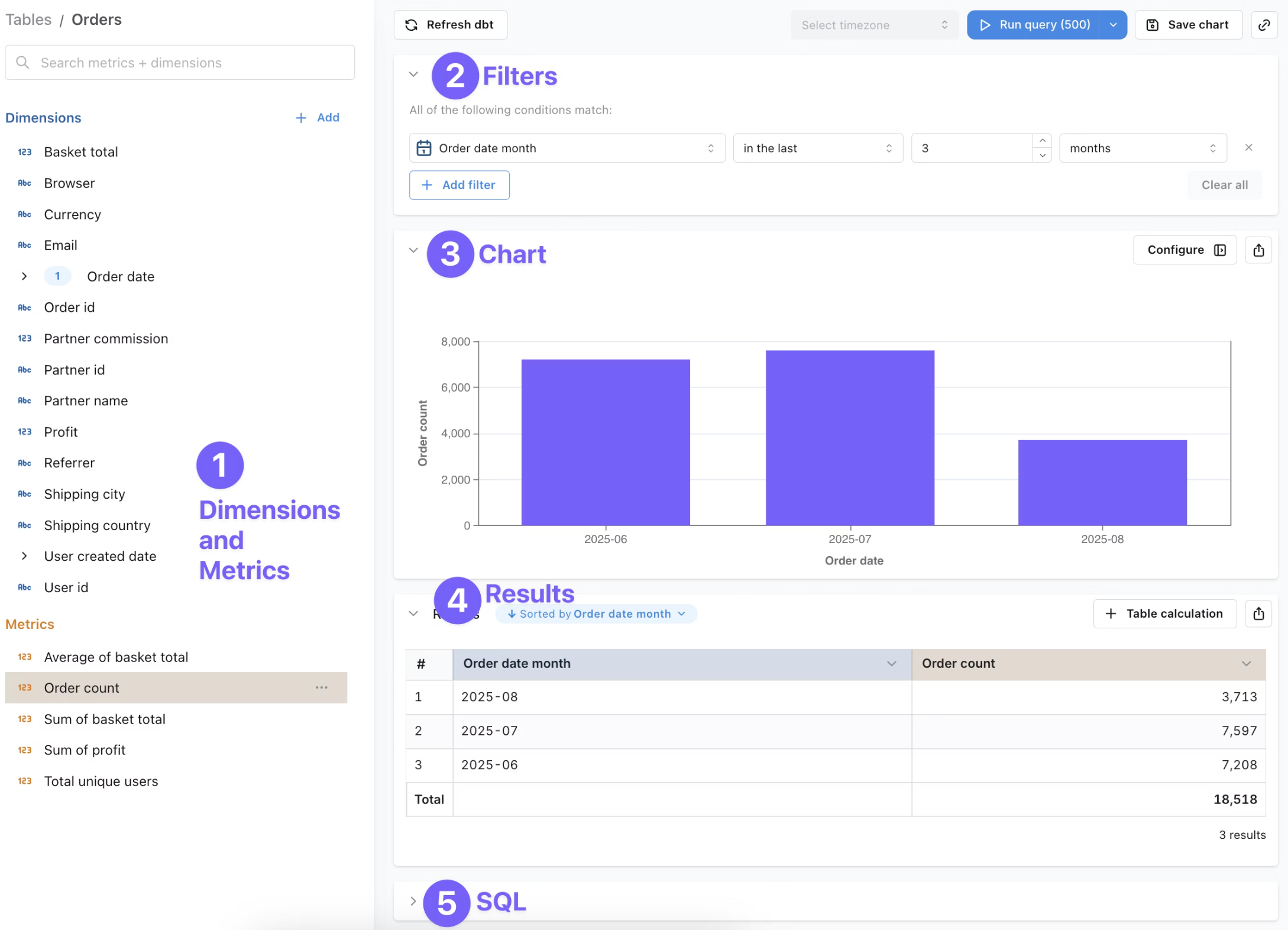
- 'Filters', 'Chart', 'Results', 'SQL' 을 사용.
- Saving -> Dashboard | Space
- ㄴ BI feature guides
- AI agents : Creating AI agent, 슬랙으로 연동, Agent Memory 설정, 등등등.
- Chart types : Bar, Line, Pie, 등등등 다양한 차트 제공.
- Table calculations : ...
- Build your semantic layer
- ㄴ Lightdash semantic layer
- 데이터 웨어하우스와 사용자간의 위치한 translation 계층.
- Consistency, Accessibility, Scalability
- Metrics, Dimensions, Tables
- ...
- ㄴ Semantic layer reference
- ...
- ㄴ Developer quickstart CLI
- ...
- ㄴ Developer guides
- ...
- Integrations
- ㄴ dbt Projects
- ㄴ Slack
- ㄴ Google Sheets
- ㄴ Lightdash MCP
[별책부록]
"Hands-on Guide to Data Modeling with dbt and Visualization with Lightdash" : https://aibunny.medium.com/hands-on-guide-to-data-modeling-with-dbt-and-visualization-with-lightdash-f6bf3c0a2b36
-끝-
'Data Broker' 카테고리의 다른 글
| dbt Labs (0) | 2025.09.20 |
|---|---|
| Airflow + Celery (0) | 2020.09.02 |
| SQS (0) | 2020.05.16 |
| RabbitMQ (AMQP) (0) | 2020.04.30 |
| Elastic Stack 란? (1) | 2020.04.12 |