
https://docs.runpod.io/serverless/overview
- GPU-powered computing, Automatic scaling, Cost efficiency, Fast deployment 를 제공. ㅎㅎ
- User -> {Endpoints} -> [Q] -> Handler functions() -> (Workers)
- Deployment options
- Hub : Runpod 콘솔 허브 페이지 -> 탐색후 Endpoint 생성.
- vLLM : LLMs 실행에 최적화 되어, huggingface 모델 및 환경변수 등을 손쉽게 셋팅.
- Worker Template : "worker-basic"(최소화된 템플릿), "worker-template"(범용), "Model-specific templates"
- custom worker : 직접 python 코드 작성 -> docker 패키징 -> 완전 제어
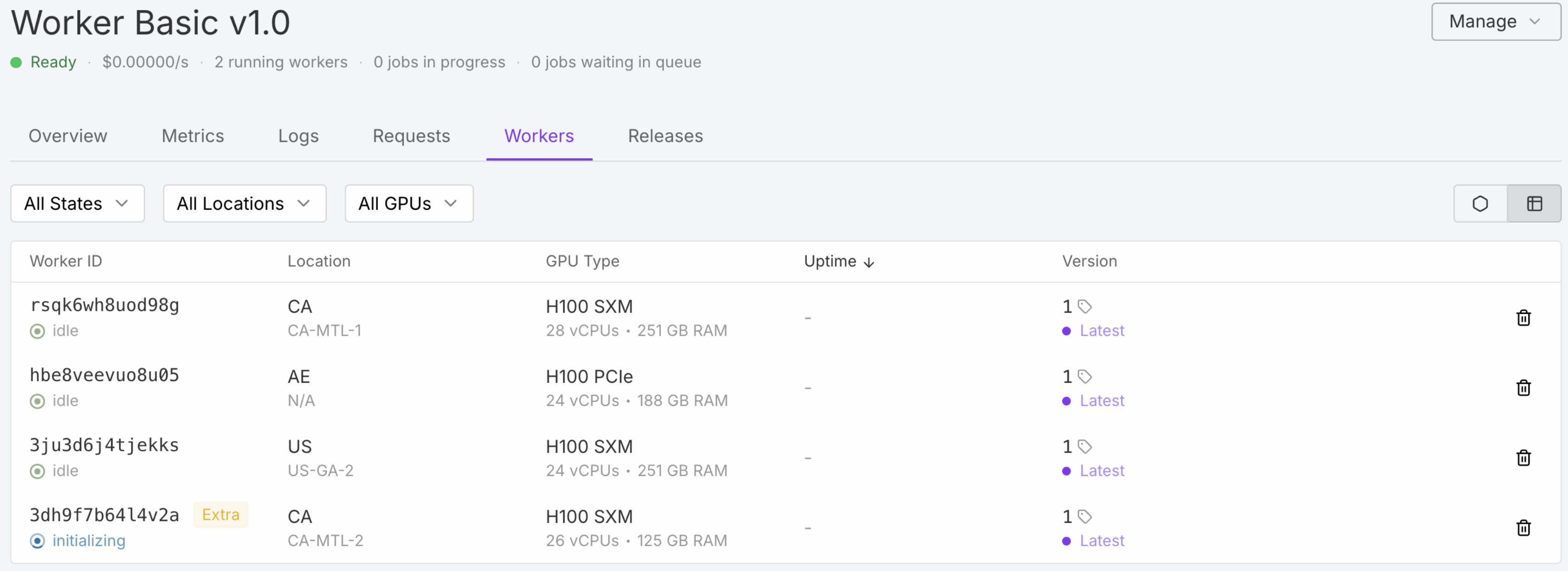
- Worker
- 컨테이너 인스턴스로, lifecycle 이 자동으로 관리되면서 리소스 비용을 최적화 함.
- (다양한 로케이션에서의 GPU 서버가 운용 됨)
- 컨테이너 인스턴스로, lifecycle 이 자동으로 관리되면서 리소스 비용을 최적화 함.
-
-
- configurations : GPU, Count, Memory, Env, Storage
- types : Active = 콜드 스타트 없이 항상 떠있음 , Flex = 트래픽 따라 그때그때 일하는 알바생 , Extra = 도커이미지 캐시 되있어야 함...
- states :
- Initializing = 도커이미지 다운로드 및 코드 로딩중.
- Idle = 준비됨. (요금은 안나옴!)
- Running = 처리중 (초단위 요금 나옴)
- Throttled = 호스트 리소스 과부하로, 워커가 중단됨.
- Outdated = 엔드포인트 업데이트 -> 10% 씩 롤링 업데이트 -> 교체 대상이 됨 (업데이트 중에도 작업은 함)
- Unhealthy = 도커이미지 등의 문제로, 워커가 중단됨.
- Build your first worker
- 1) handler.py 및 test.json 및 Dockerfile 작성
- 2) Docker 이미지 빌드 및 푸쉬
- 3) Runpod Console -> +New Endpoint -> Custom Source -> Docker Image
- Handler functions & Concurrent handler
- types :
- Standard handlers : 기본
- Generator handlers : 스트림 데이터 처리.
- (디폴트 '/stream' 으로 호출) ('return_aggregate_stream' 옵션시, '/run' 및 '/runsync' 가능)
- Asynchronous handlers : 비동기 처리. (대용량 등등, 동시성을 높일수있음)
- Concurrent handlers : 단일 워커로 작은 작업들을 GPU 쪼게 동시에 처리.
- advanced controls : "runpod.serverless.progress_update", "refresh_worker", ...
- handler 함수 : 반복적인 로직으로, 큰 모델을 로딩하는 등의 코드는 밖으로 뺴야함.
- payload limits : /run = 10MB , /runsync = 20MB
- types :
- Deploy workers from a Docker registry
- Deploy workers from GitHub
- Endpoints
- ServerlessWorker 의 진입점이 되는 RESTful API
- Execution : /run = 비동기 처리 , /runsync = 동기 작업
- Deployment and Scaling : 오토스케일 워커갯수, GPU 우선순위, 환경변수 등을 설정
- ("executionTimeout: 제약시간", "ttl: 큐 제한시간", "lowPriority: 자동스케일off" 등)
- Integration : webhook 알림 및 S3 연동 설정
- Manage, Send API
- /runsync , /run , /status , /stream , /cancel , /retry , /purge-queue , /health
- Setting
- "GPU selection", "Active workers", "GPUs per worker", "FlashBoot", ...
- "Auto-scaling" (queue delay, request count), ...
- Reducing worker startup times : 1) Embed models in Docker , 2) Store large models on network volumes
- Storage options
- Cached models
- 'Faster cold starts', 'Reduced costs', 'Accelerated deployment', 'Smaller container images'
- Job states and metrics
- Load-balancing Endpoints
- vLLM workers
- Development 기능들
-
https://docs.runpod.io/storage
- ...
- Network volumes
- S3
[%실습] https://docs.runpod.io/tutorials/serverless/run-your-first
- 1) Runpod Console -> Quick Deploy -> Stable Diffusion XL -> Deploy
- 2) curl -X POST https://api.runpod.ai/v2/{ENDPOINT_ID}/run
- -H 'Content-Type: application/json'
- -H 'Authorization: Bearer [Your API Key]'
- -d '{"input": {"prompt": "A cute fluffy white dog in the style of a Pixar animation 3D drawing."}}'
- 3) Output -> {"image_url": "data:image/png;base64 ..."} -> Decode and Save Image
[%실습] https://docs.runpod.io/tutorials/serverless/comfyui
- 1) Runpod Console -> ComfyUI Hub 목록 -> model version 선택 -> Deploy
- runpod/worker-comfyui:<version>-base : 사전 설치된 모델이 없는 버전
- runpod/worker-comfyui:<version>-flux1-dev : FLUX.1 dev 모델
- runpod/worker-comfyui:<version>-sdxl : Stable Diffusion SD3 모델
- ...
- (Model 이 필요하거나, 자체 LoRA가 있거나, 사용자 지정 노드가 필요한 경우 등)
- (사용자 지정 가이드를 사용하여 custom worker 를 직접 만듬)
- 2) comfyui_workflow.json 준비 작성
- 3) curl -X POST https://api.runpod.ai/v2/{ENDPOINT_ID}/run
- -H 'Content-Type: application/json'
- -H 'Authorization: Bearer [Your API Key]'
- -d @comfyui_workflow.json
- 4) Output -> {"data:image/png;base64,iVBORw0KGgoAAAANSUhEUgAABAAAAAQACAIAAADwf7zU..."} ->
-끝-
'AI' 카테고리의 다른 글
| runpod_ (ComfyUI Worker Template) (0) | 2025.07.20 |
|---|---|
| Novel AI (0) | 2025.04.26 |
| Elevenlabs Docs (conv ai) (0) | 2024.12.08 |
| Elevenlabs Docs (dev/api) (0) | 2024.12.08 |
| Lang🦜 (feat. teddynote) (0) | 2024.10.24 |